
The Basics
Quantum Integrator is made up of two main components: Integrations and Users. Integrations are the 3rd party services that our PBX service is going to communicate with. Users represent the employees that are using both the PBX service and one or more Integrations.
Existing PBX users and supported Integrations are already loaded into the application, making it simple and easy for you to link your Hosted PBX users to your 3rd party applications.
Nuts & Bolts
Integrations
We're regularly working on new Integrations. If your business uses a service that you think can benefit from a PBX integration, be it a CRM service, ticketing system, or something else, use the links to the right to let us know.
Otherwise, click the button below to see the Integrations that we're currently supporting.
Meet the IntegrationsRelease Notes
What's been going on with Quantum Integrator? Keep up with all of the major and minor changes, new Integrations, and everything else.
See the Release NotesHow It Works
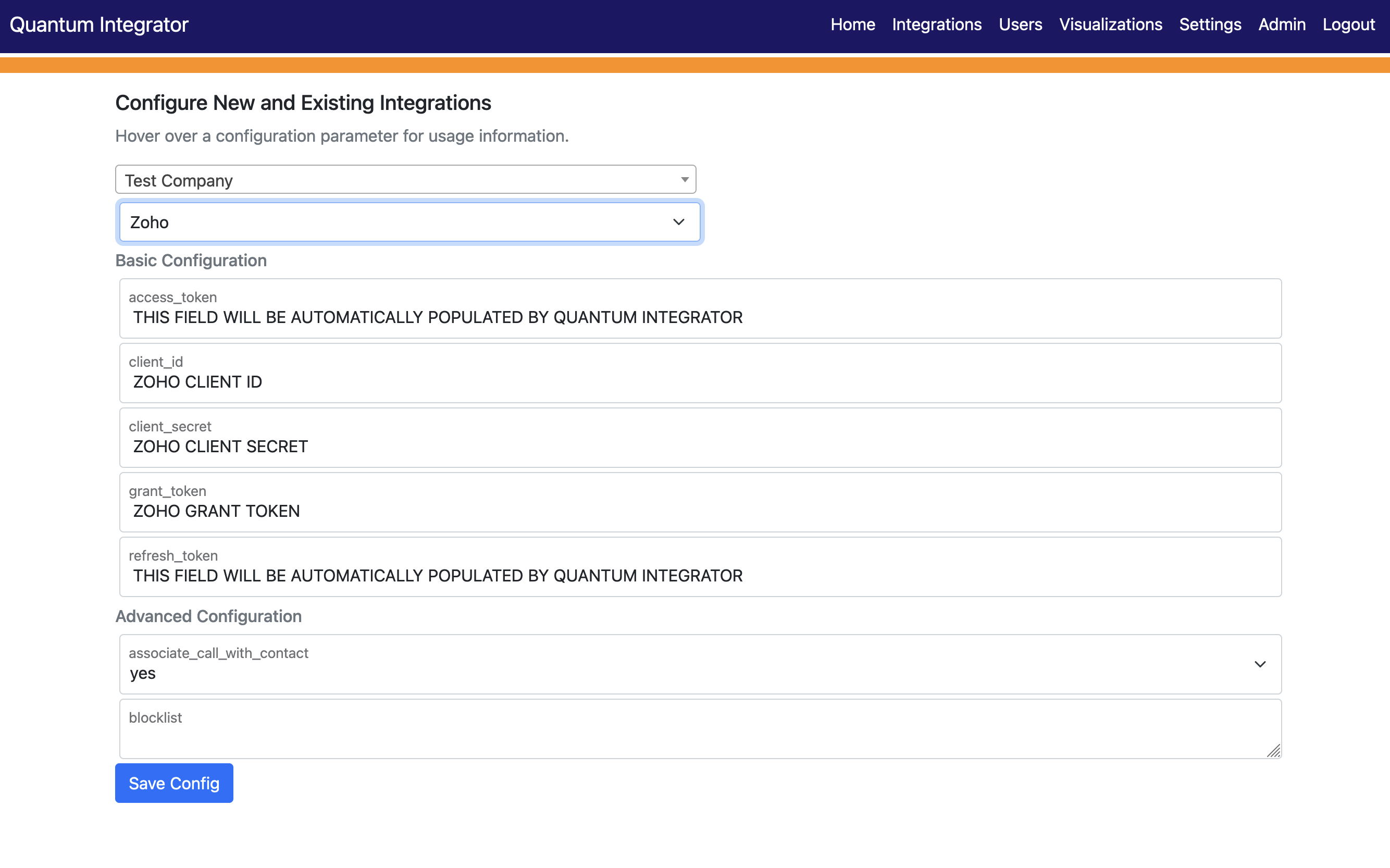
Integrations
The Integrations section is where you configure the high-level settings that allow Integrator to communicate with the 3rd-party application.
Many cloud-based applications allow software to commuicate with it via an Application Programming Interface (API). These APIs allow Quantum Integrator to collect calling data from your Hosted PBX telephone service and send it to an integrated application. Depending on the Integration, that call data may be used to query users in your CRM platform, log support calls in your trouble ticketing system, write call detail records, and more.
In addition to information needed to talk to the various APIs, many of our Integrations also have custom settings that allow you to tailor the service to best fit your needs. These may include number blocklists to ignore calls to/from specific numbers, call association settings, etc.
To learn more about a specific Integration, click the button below!
Find Your IntegrationUsers
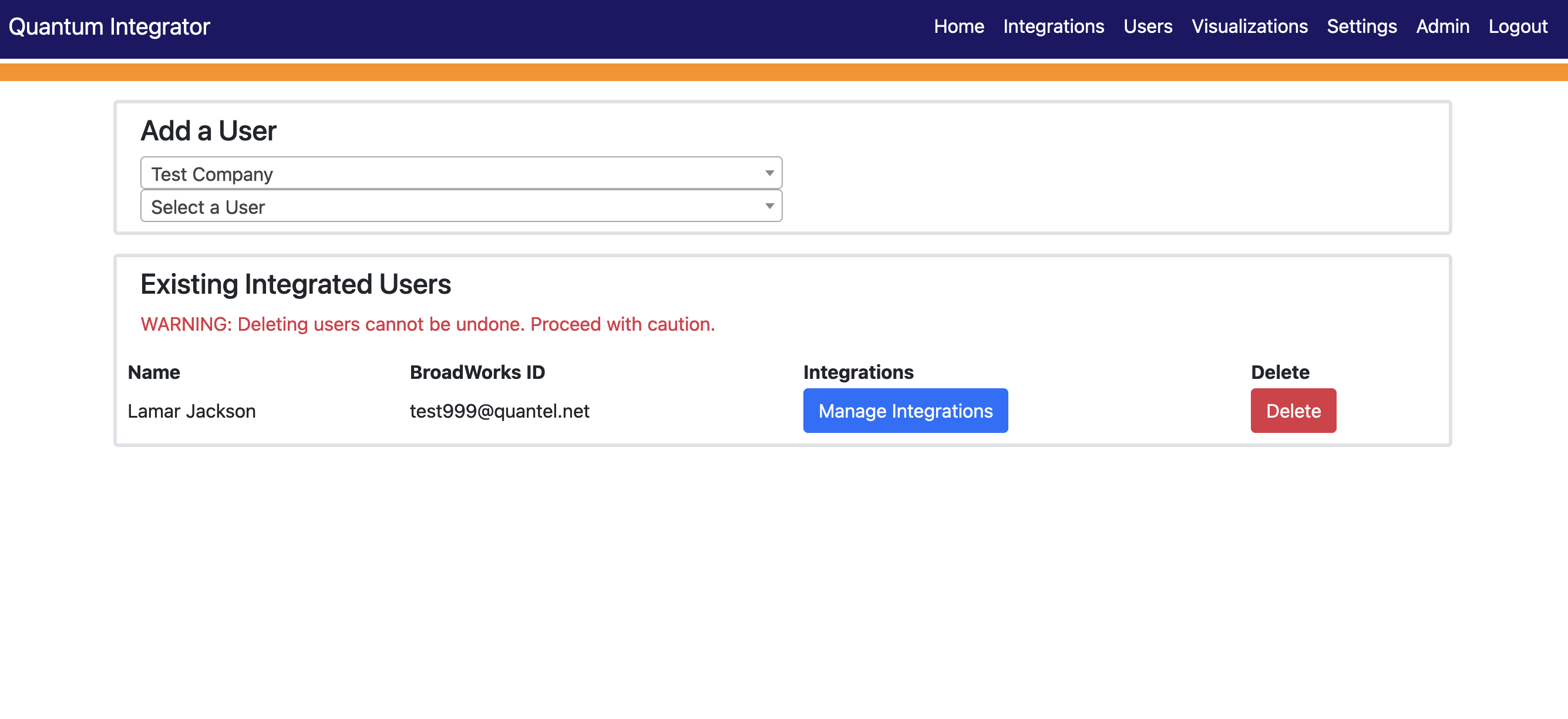
The Users section is where you link existing PBX users and Integration users together, along with configuring any integration-specific options for those users.
Existing users are also managed through this page.
Your existing PBX users are dynamically loaded into the application, so all you need to do to on-board a new user is select them from the list, choose the Integration you would like to configure, fill out the necessary information, and Submit.
To edit an existing user's Integration, simply click Manage Integrations, change what you need, then click Save.
Deleting an integrated user is as easy the clicking the Delete button associated with that User. A confirmation window will tell you if you were successful or not.
Meet The Integrations
Google Sheets - Basic call detail records.
Google Sheets is a hosted spreadsheet, allowing data to be collected and shared quickly and easily. In conjunction with the Cloud Console, you can allow Integrator to write CDRs to a Sheet, allowing for nearly real-time logging of connected calls.
Our PBX integration allows for basic Call Detail Records to be automatically logged to a Google Sheet. Currently, only inbound calls answered by a person, and connected outbound calls are logged.
To get started, click Integrations from the navbar at the top of the screen, then choose Google Sheets. You'll need some information from both the Cloud Console and Sheets to configure the Integration. You can watch the video on the right to get started, or click here to open it in a new tab.
After you've set up Sheets, check out the accompanying Visualizations integration, which can display your call detail records in a variety of easy to read graphs.
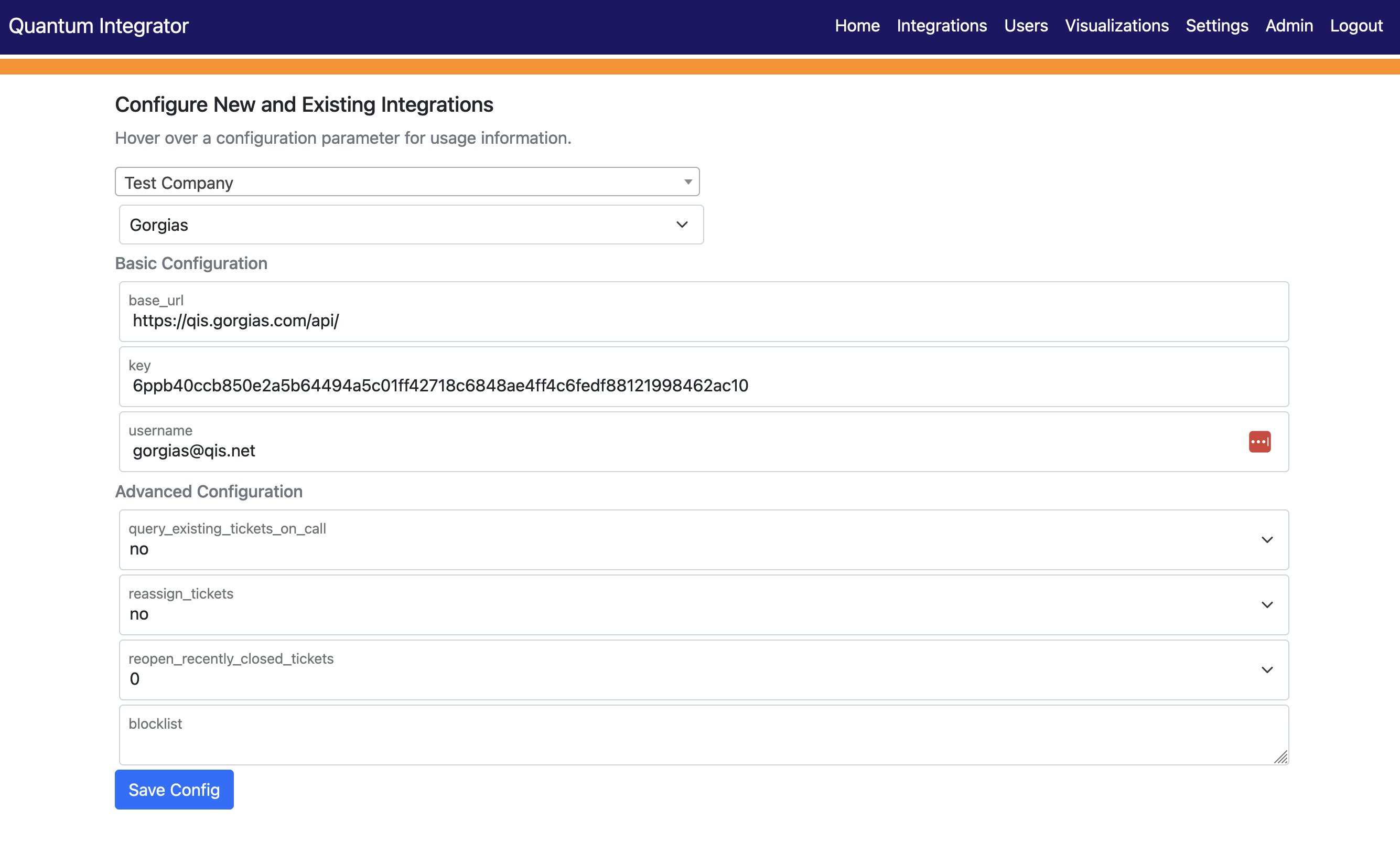
Gorgias - Helpdesk designed for e-commerce stores.
Gorgias is an ecommerce helpdesk platform used as both a centralized support ticket platform and a customer database, allowing for a variety of customer interaction methods via their channel concept.
Quantum's PBX platform integrates allowing support personnel to have tickets automatically created for them, eliminating the need to query your existing Gorgias customer database. Quantum Integrator will automatically create a new Customer entry based off of calling information should a calling number not already exist as a contact channel associated with an existing Customer. Custom settings control at the User level allows you to tailor the service to the integrated user.
To get started, click Integrations from the navbar at the top of the screen and choose Gorgias from the Integration dropdown. Fill out the required information and click Save Config when done. The information you need can be found from your Gorgias website under Settings -> You -> REST API. If you need more help, you can hover over the fields for additional information.
HubSpot - Generate leads, close deals, and create remarkable customer experiences.
HubSpot is a CRM platform for managing sales, marketing, content management, and customer service.
Our PBX integration allows sales personnel to have inbound and/or outbound calls automatically logged, eliminating the need to perform tedious manual entry and ensuring that as much engagement data as possible gets collected. Company-level settings provide control over automatic association of call engagement to Contacts, and custom settings control at the User level allows one to tailor the service to the individual integrated user.
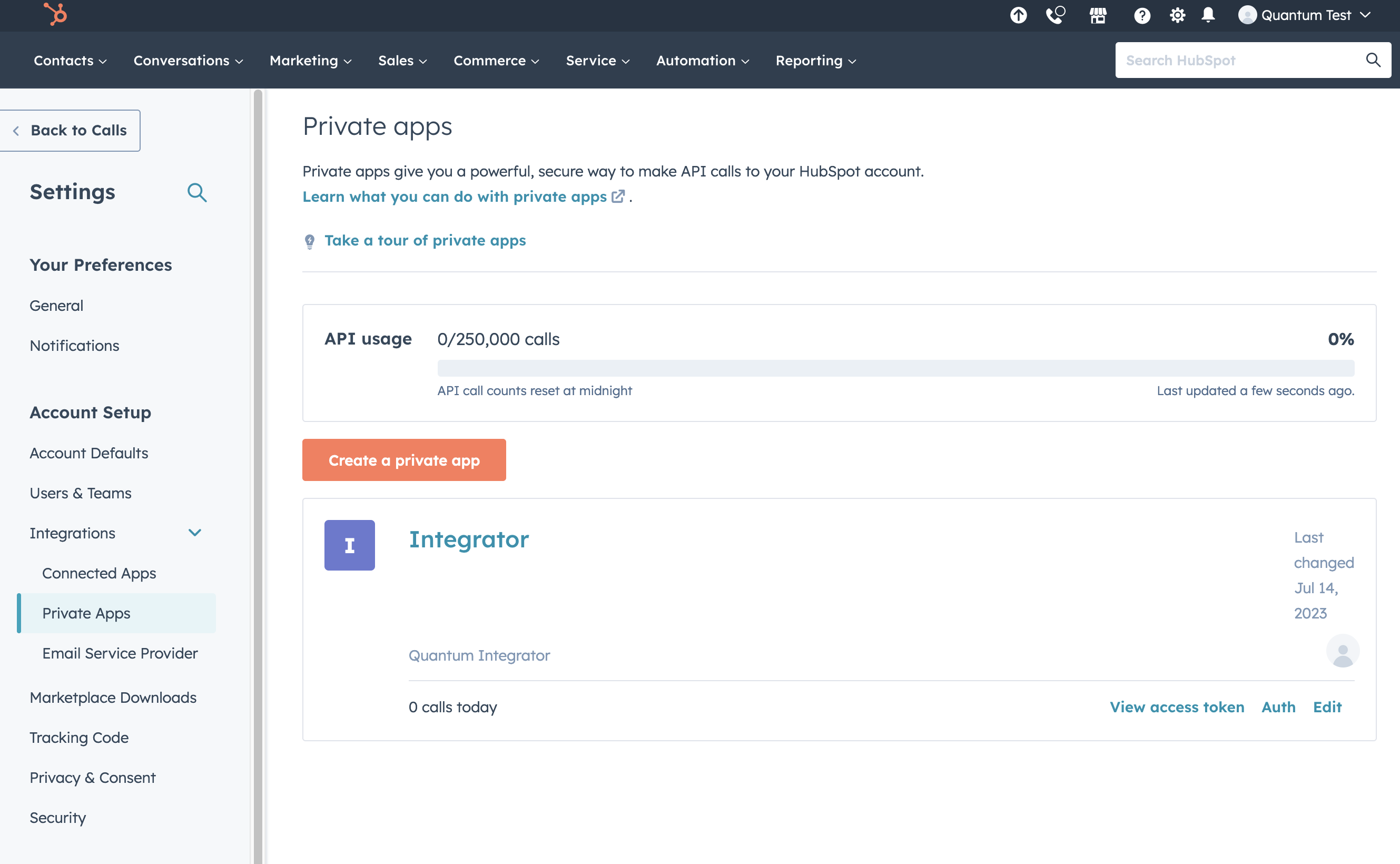
To get started, click Integrations from the navbar at the top of the screen, then choose HubSpot from the Integration dropdown. Fill out the required information and click Save Config when done. In your HubSpot account, a Private App will need to be created and given the following permissions: crm.objects.contacts.read, crm.objects.contacts.write, and crm.objects.owners.read. Once created, the API key will be needed to complete the integration. If you need more help, you can hover over the fields for additional information.
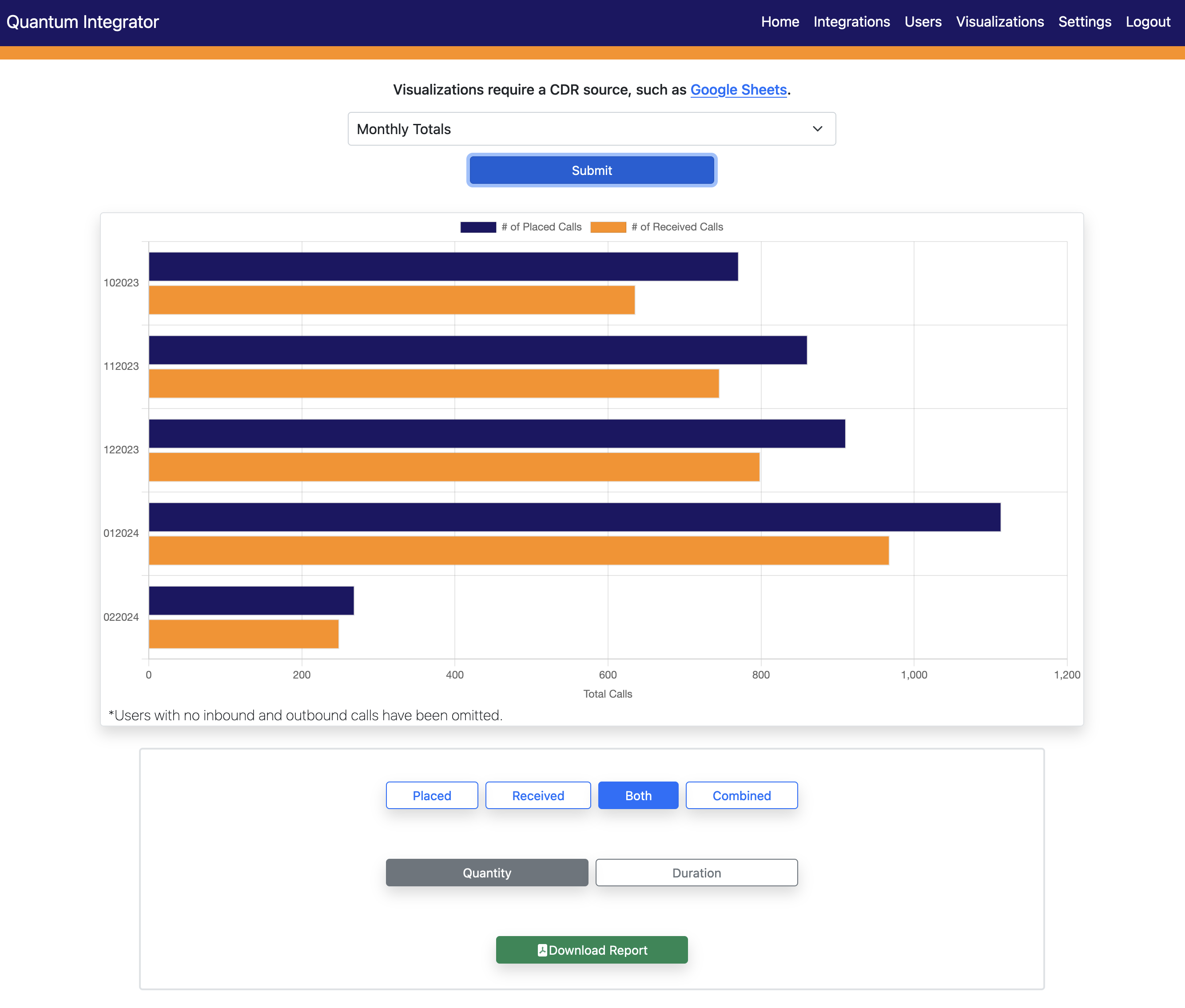
Visualizations - Designed for Google Sheets.
Visualizations is a call log visualizer, featuring a variety of graphs in a fast, responsive design.
To get started, click Visualizations from the navbar at the top of the screen and choose an option from the dropdown. The visualizations fetch data from the Google Sheets CDR integration, creating bar graphs out of the records written to the monthly sheets. Graphs can quickly be redrawn to show duration and/or quantity of calls. You can also fiter on call types.
In addition, you can export the data into a PDF report.
Zoho CRM - A unique and powerful software suite for businesses of all sizes.
Zoho CRM is a full-featured CRM providing everything you need to increase leads, accelerate sales, and measure sales performance.
Our PBX integration allows sales personnel to have in and outbound calls automatically logged, eliminating the need to perform tedious manual entry and ensuring that as much engagement data as possible gets collected. Company-level settings provide control over automatic association of call engagement to Contacts and/or Leads (if more than one Contact/Lead are found, the call will be associated with the first result returned by Zoho), and custom settings control at the User level allows one to tailor the service to the individual integrated user.
To get started, click Integrations from the navbar at the top of the screen, then choose Zoho from the Integration dropdown. You'll need to create a Self Client application in the Zoho API Console. You can watch the video on the right to get started, or click here to open it in a new tab.
Release Notes
Version 1.4.1
Zoho CRM Integration
- Modified call associations to allow for Lead association in addition to Contacts. New options allow the choice of "both", "contacts", "leads", or "none" when logging a call.
Google Sheets
- Elevated from beta to release candidate.
General
- UI improvements.
Bugfixes
- Fixed a bug where apostrophes in certain content were displaying a quotation mark.
Version 1.4.0
Zoho CRM Integration
- Introduced Zoho CRM integration. Quantum Hosted PBX customers can now link their calls to Zoho!
General
- UI improvements.
Bugfixes
- Fixed a bug in Google Sheets where names were not always formatted properly.
- Fixed a bug in Google Sheets where sheets may be created inappropriately.
- Fixed a bug in Visualizations where controls were not being reset when a new month was selected.
- Fixed a bug in Visualizations where graphs were not always drawn upon clicking Submit after selecting a new month.
Version 1.3.2
General
- Integration processing performance improvements.
Version 1.3.1
General
- Integration processing performance improvements.
- Sorting Integrations by ascending ABC order.
Google Sheets Integration (beta)
- Visualizations. Modified graphs to draw users on the X axis to improve readability for larger customers, especially when output to PDF.
- Visualizations. Sorting users by ascending ABC order.
Version 1.3.0
Bugfixes
- Some typos fixed.
Google Sheets Integration (beta)
- Introduced Google Sheets integration (beta). Quantum Hosted PBX customers using Google Sheets can now write basic Call Detail Records (CDRs) to Sheets. This Integration is currently in beta, and as such may experience unexpected issues, have limited functionality, and be subject to change as development continues.
- Introduced Visualizations. Customers using Google Sheets as a CDR source can view graphs containing CDR data, and download basic PDF reports.
Version 1.2.0
General
- When managing existing User's Integrations, you can now enable/disable individual integrations using the toggle to the left of the Integration name.
Gorgias Enhancements
- Blacklist - A number blacklist has been added under the Advanced Configuration for the Integration. Numbers can be added in a comma-separated list (ex - 4102396920,4102390820) and will be ignored if your users make or receive calls to/from them.
HubSpot Integration
- Introduced HubSpot integration. Quantum Hosted PBX customers using the HubSpot CRM can now integrate their telephone service to the HubSpot CRM platform.
Bugfixes
- Fixes that prevented Gorgias tickets from being opened under certain conditions.
- Corrected some styling issues where modals would not always appear centered on the page.
Version 1.1.0
Gorgias Enhancements
- Query Existing Tickets On Calls - When a call is answered (or released, depending on user configuration), a new ticket isn't created until Integrator first queries the Gorgias ticket database for an existing open ticket associated with the calling customer. If enabled (which is the default), new tickets are only opened if Integrator can't find an existing open ticket.
- Reassign Tickets - If enabled, this setting will automatically reassign an existing ticket to the user who just answered the call. The ticket will show in their "My Tickets" screen under "My Open". This setting requires that 'query_existing_tickets_on_call' be enabled.
- Re-open Recently Closed Tickets - If set to a value other than 0, this setting will query recently closed tickets in addition to open ones. Values other than 0 represent the number of days Integrator will search back looking for a closed ticket before deciding to open a new one should it not find a match. This setting also requires that 'query_existing_tickets_on_call' be enabled.
Version 1.0.0
- Initial release
